Making the future tangible. A digital studio for exploring a first career.
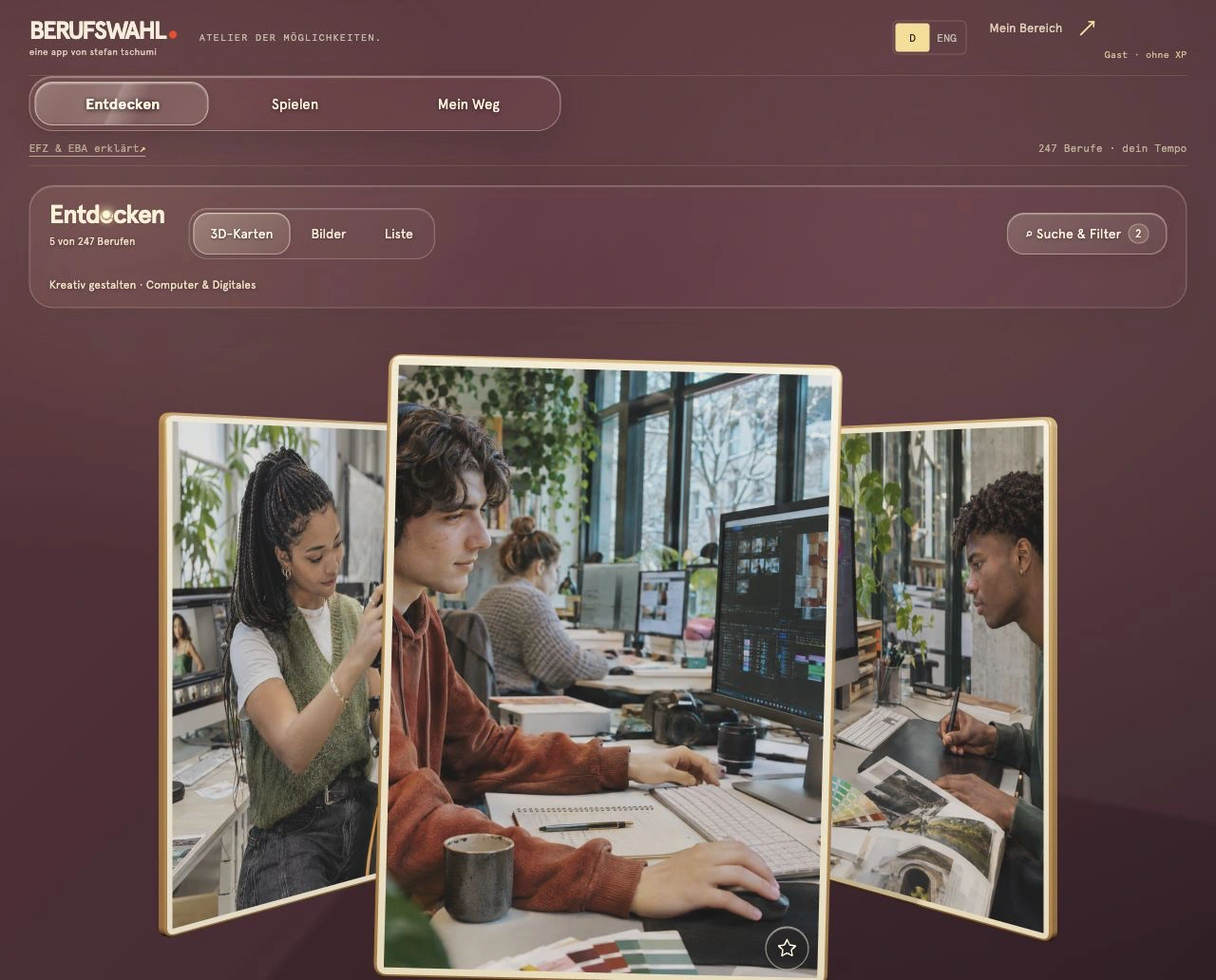
BERUFSWAHL brings together 247 Swiss EFZ and EBA apprenticeship profiles with a playful introduction to working life. Instead of starting with a long list of job titles, the encounter begins with an image: an activity, a tool, a material. Spatial cards can be browsed and turned over. Looking closer opens a career profile with everyday tasks, entry requirements, useful school subjects and questions for a taster placement.
This self-initiated project connects my design practice with my training as an artist and art educator. I developed its concept, visual language, imagery, learning activities and technical implementation. The three areas — Discover, Play and My Path — lead from curiosity to practical next steps: comparing careers, thinking through workplace situations, practising an application and exploring apprenticeship vacancies.
Self-initiated · Concept, design, learning design, development and AI-assisted image production: Stefan Tschumi.
Available in German and English in the browser. A profile is optional for getting started.
01
Starting point
Choosing a career often assumes that young people already know what to search for. BERUFSWAHL offers a way in before that point: observing, forming a hypothesis, recognising interests and developing questions. The images invite conversation; the career profiles help users compare a first impression with specific tasks and requirements.
The activities encourage decisions and explanations rather than assigning a career to a person. Personal strengths, school requirements and skills that can still be learned are kept distinct. Sources and links to berufsberatung.ch connect exploration with information that can be checked. The app complements taster placements, teaching and career guidance; it is not an aptitude test.
02
Interaction
Each card offers two perspectives: a workplace scene and a view of tools and materials. Swiping or using the arrow keys moves through the collection; tapping turns a card; a double tap or Enter opens its profile. Search, filters, image and list views also provide direct access. Saving and comparing careers turns individual discoveries into a personal selection.
The card lab invites close reading of visual clues. Workplace cases explore practical decisions, while the education quiz introduces possible paths through EBA and EFZ qualifications. My Path brings together questions for a taster placement, application practice and a next step of the user's own. Fictional application scenarios are identified as exercises; real vacancies link to the official apprenticeship search. Core activities are available in guest mode.
03
Visual language
The interface turns career exploration into an inviting workspace. Warm red, ochre and olive tones distinguish Discover, Play and My Path. Light typography and golden edge highlights hold the areas together visually. The red dot in the wordmark provides a small recurring accent. Translucent controls and directional light give the cards spatial depth.
Materiality serves a purpose: turning a card makes the change between tools and activities visible, while spatial layering reveals neighbouring cards. A collection of 494 photorealistic, AI-generated illustrations provides one image pair per career. Different people and work environments broaden the imagery without presenting one scene as a definitive account of a profession. On phones, the cards and thumb-accessible navigation take priority; desktop screens give comparison and detailed information more room.